As enterprises use more agents, they need one system to operate them.
Agents now sign in to business applications, operate enterprise software, process files, use mobile devices, and run on schedules. Enterprises need to know where each agent runs, what it can access, when a person should take over, and how many resources it consumes.
Agent Runtime is becoming a distinct product layer for continuous operation, tool access, state, permissions, and observability.
BeeOS sits between agents and real business environments, providing one runtime across cloud, local, self-hosted, desktop, and mobile execution.
Deploy faster, keep existing systems, retain control of execution and data, and manage state, screens, logs, and usage centrally.
Agent Runtime is the core, with continued expansion into automation, task boundaries, and agent collaboration.
Agents entering business operations need a common runtime.
As agents connect to websites, computers, devices, and business systems, enterprises need one way to manage deployment, connections, access, and cost.
Agents are being connected to real business systems and devices.
Production work requires agents to sign in, use tools, read files, operate software, and repeat tasks over time. The runtime location and management layer therefore become product requirements.
Business applications
Sign in to operations, finance, procurement, CRM, and other business systems to query data, update records, and download files.
Desktop and files
Operate desktop software, organize local files, read spreadsheets, and work with legacy enterprise systems.
Mobile devices
Open Android apps, navigate screens, enter content, take screenshots, and inspect runtime state.
Development tasks
Run code in cloud or local environments, edit files, execute commands, and preserve the workspace.
Recurring work
Run checks, preparation, and notifications every day, hour, or week without keeping a person on the page.
Agent collaboration
Delegate subtasks to another agent while synchronizing state, inputs, and results.
Agent Runtime is becoming an independent product layer
AWS AgentCore frames runtime around deployment, sessions, identity, protocols, and observability. Cloudflare Agents provides state, sessions, schedules, recovery, and tools. OpenClaw also relies on gateways, sessions, nodes, and a persistent operating environment.
Market implication: enterprises will adopt not only agents, but also the runtime that keeps them connected, operating, and manageable.
Six questions determine whether an agent can enter production.
Deployment, connectivity, continuous operation, visibility, access, and resource usage are the basic conditions for production work.
Public cloud, a local computer, or enterprise infrastructure; which Region; and who operates the infrastructure.
Websites, desktop applications, Android devices, APIs, tools, and business accounts.
Schedule, start, pause, resume, stop, and restart work while keeping task and session context.
Inspect state, screens, logs, and events; intervene for sign-in, approval, or exceptions.
Define accessible tools, accounts, and data, plus actions that need human confirmation or budget limits.
Track model calls, instance runtime, device use, and tool services.
Different product categories solve different parts of the agent stack.
Enterprises may use agent applications, coding agents, orchestration platforms, cloud runtimes, and device automation together. BeeOS connects these products to real operating environments.
Complete research, office, operations, or industry-specific work for end users.
Handle code, projects, files, and engineering tasks.
Design workflows, knowledge bases, model nodes, tools, and application logic.
Deployment, instances, sessions, devices, schedules, state, takeover, protocols, and usage.
Public clouds, enterprise servers, local computers, browsers, desktops, and Android devices.
BeeOS focuses on running across agents, environments, and devices.
The useful comparison is not who has the longest feature list, but which operating scope and deployment choices each category provides.
| Category | Primary job | Typical runtime scope | Relationship to BeeOS |
|---|---|---|---|
| Agent applications | Complete user tasks directly | The product's own cloud or client | Can run on or connect to BeeOS as an upper-layer agent |
| Development agents | Code, file, and engineering work | Terminal, IDE, local, or cloud environments | Can use runtime capabilities through CLI, SDK, APIs, or adapters |
| Orchestration platforms | Workflows, knowledge, and AI applications | Platform cloud or self-hosted deployment | Provide business logic while BeeOS supplies execution environments and devices |
| Cloud runtimes | Deploy and run agents in one cloud | The provider's cloud infrastructure | Validate the runtime category; BeeOS emphasizes multiple environments and devices |
| RPA and device automation | Repeat actions on web, desktop, or devices | A designated automation environment | BeeOS extends its runtime foundation toward Agentic RPA |
Cloud runtime strengths
Cloud providers offer mature elastic compute, identity, logging, and global deployment. AWS AgentCore and Cloudflare Agents support framework or model choice alongside protocols, state, and runtime services.
BeeOS focus
Bring Cloud, Local, Self-hosted, Browser, Desktop, and Android into one product, with direct deployment or standards-based access for OpenClaw, other agents, and enterprise systems.
BeeOS gives different agents the same runtime and management layer.
Keep existing agents, models, tools, and business systems, and connect BeeOS wherever deployment, persistent operation, device execution, or centralized management is needed.
Deploy · Run · Connect · Observe · Take over · Control · Measure
Neutral access
Deploy adapted agents directly; connect others through OpenAPI, MCP, A2A, CLI / SDK, or adapters.
Multiple environments
Choose Cloud, Local, Self-hosted, and Region based on task, data, and infrastructure needs.
Real execution
Connect browsers, desktops, Android, real devices, files, shells, and enterprise APIs.
BeeOS delivers six direct benefits to enterprises.
Deploy agents faster, keep existing systems, and place runtime operations, access, data, and cost within a manageable boundary.
Create adapted agent instances without rebuilding servers, gateways, workspaces, and management entry points.
Use OpenAPI, MCP, A2A, CLI / SDK to connect existing enterprise systems, tools, and agents.
Use Cloud to start quickly, Local for local environments, or Self-hosted for enterprise infrastructure.
See instances, sessions, devices, state, logs, screens, schedules, and usage from one place.
Let employees intervene for sign-in, verification, approval, page changes, or device exceptions.
Turn stable steps into automations that can be repeated and delivered at scale.
Different teams gain different value from BeeOS.
Industry enterprises
Connect agents to business applications, legacy systems, computers, and Android devices while retaining self-hosting, visibility, and human takeover.
IT and product teams
Manage multiple agents, environments, tools, and usage, with clear access and operating boundaries.
Engineering teams
Use ready-made Runtime, Browser, Desktop, Device, MCP, A2A, and SDK capabilities instead of rebuilding the foundation.
Agent solution providers
Manage agents and customer environments together, then turn implementation work into repeatable automation and delivery assets.
BeeOS covers three common enterprise task patterns.
Business operations
An agent signs in to an operations or business system, queries data, downloads files, updates spreadsheets, and hands exceptions to the owner.
- Browser / Desktop
- Schedule
- Logs and takeover
- Run history
Android operations
An agent opens Android apps, clicks and types, captures screens, checks state, and lets an employee remotely take over a real device.
- Cloud Device
- Real Device
- Live screen
- ADB / APK
Self-hosted agents
An agent runs on enterprise infrastructure, connects to internal systems through standard protocols, and remains visible from a common management entry point.
- Self-hosted
- OpenAPI / MCP
- Instance management
- Data boundary
BeeOS extends Agent Runtime into automation and collaboration.
Runtime handles deployment, operation, and management. The broader product system connects reusable processes, task boundaries, and agent collaboration.
BeeOS expands from runtime into process, control, and collaboration.
| Product layer | Direct value | Capability scope | Product position |
|---|---|---|---|
| Agent Runtime | Run, connect, and manage agents | Instances, sessions, devices, connections, and usage | Core today |
| Agentic RPA | Save completed work as repeatable flows | Process reuse, result checks, and execution records | Capability expansion |
| Wallet & Pay | Bring permissions, budgets, and approval into tasks | Task boundaries and payment coordination | Product direction |
| Agent Network | Let agents discover, delegate, and collaborate | Discovery, delegation, state, and result exchange | Collaboration |
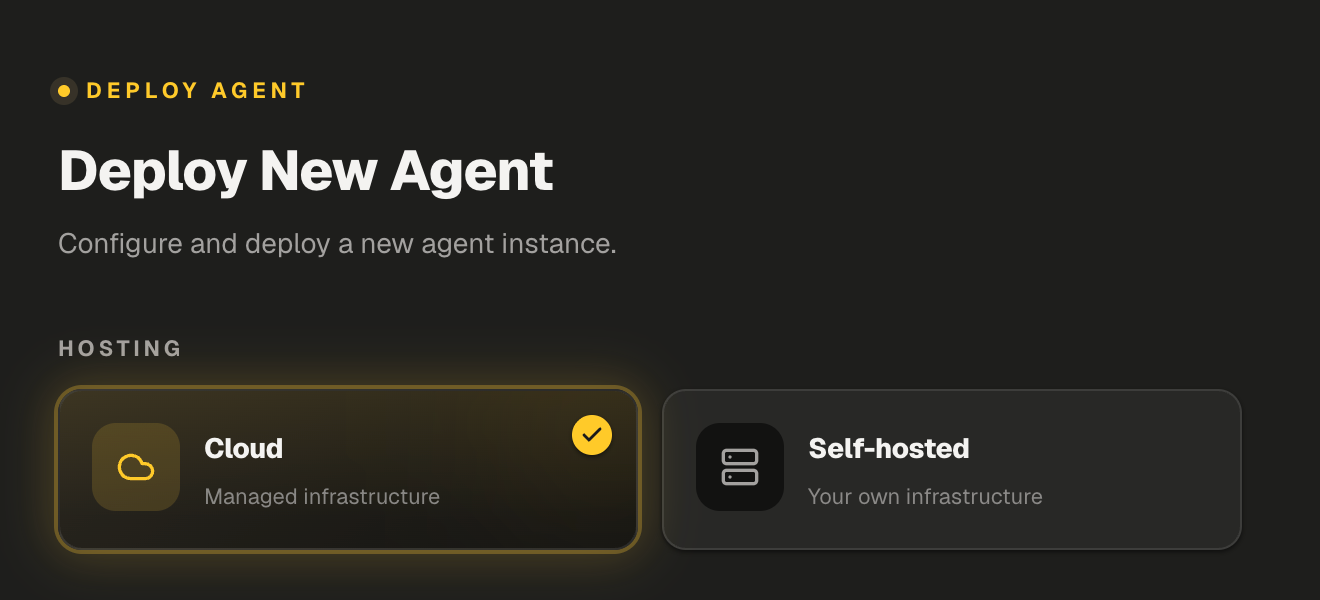
Choose a runtime location and agent type, then create an instance.
An Agent Instance contains its runtime location, agent type, Region, resources, state, and workspace.
Cloud or Self-hosted; bind Local through the desktop client.
Deploy an adapted type or connect through protocols and adapters.
Place resources near users, devices, or business systems.
Enter the Workspace and connect environments, tools, and tasks.
 1
1Three runtime locations
BeeOS manages the runtime infrastructure for fast instance creation.
Run and bind a local OpenClaw through the desktop client.
Run execution nodes on customer-controlled infrastructure.
Agent access methods
| Type | Access | Method |
|---|---|---|
| OpenClaw | Direct deployment or local binding | Direct use |
| Hermes Dify Claude Code | Protocols, CLI / SDK, or adapters | Compatible access |
| Custom agents | OpenAPI, MCP, A2A, SDK | Standard access |
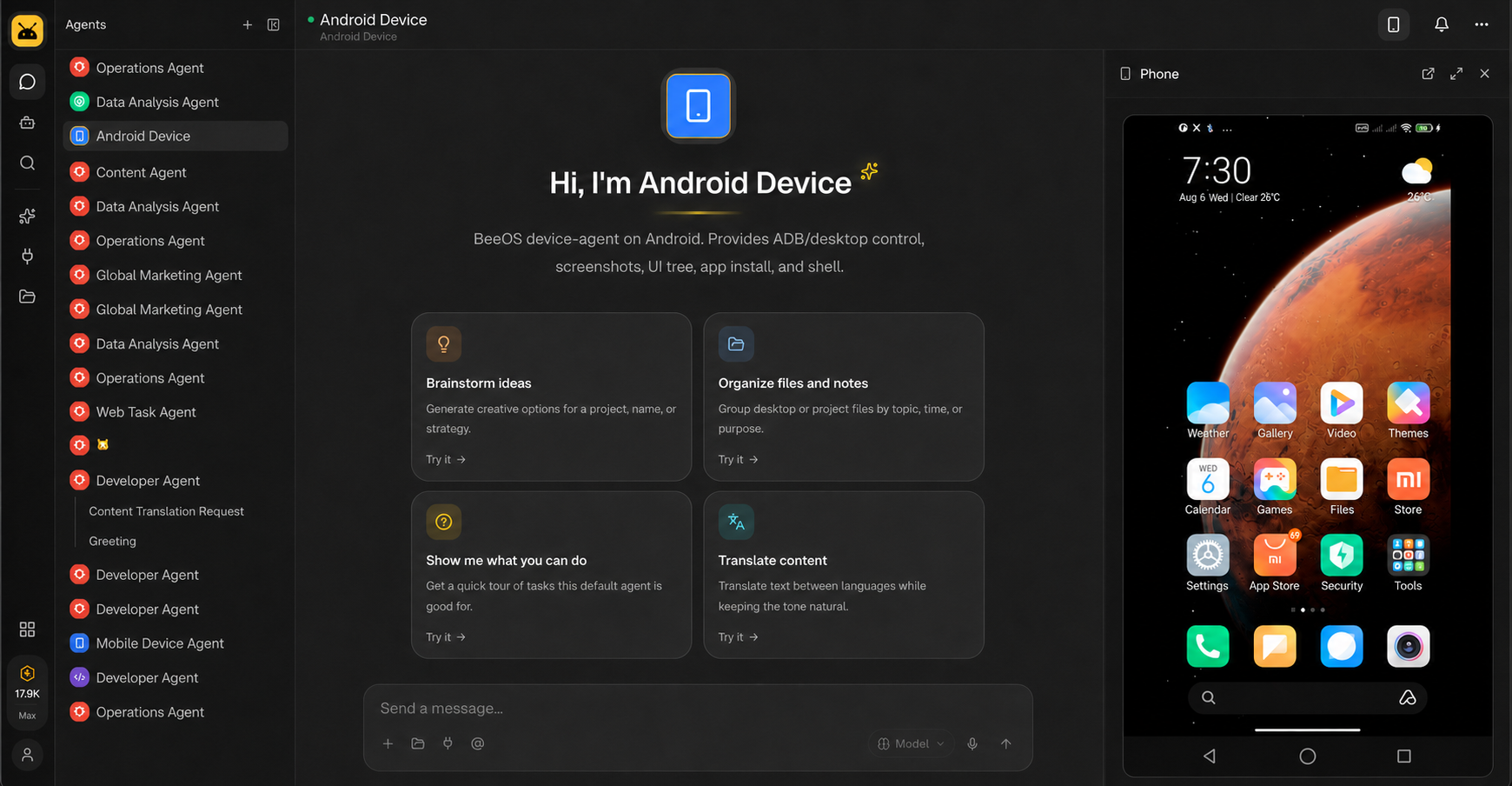
One workspace connects browsers, computers, and Android devices.
Agents can use different execution environments for different tasks while users keep sessions, screens, and devices in one Workspace.
 123
123Browser
Open websites, search for information, complete forms, upload or download files, and operate web business systems.
Available nowDesktop
Operate Windows software and files, including legacy and specialist applications that browser automation cannot cover.
Available nowAndroid Cloud Device
Run mobile tasks in cloud Android environments and manage device instances, screens, and actions centrally.
Available nowAndroid Real Device
Connect physical devices with screen, touch, keys, screenshots, APK installation, Shell, and ADB capabilities.
Available nowSee the runtime and take control when needed.
Runtime keeps instances operating while showing teams what agents are doing and where exceptions occur.
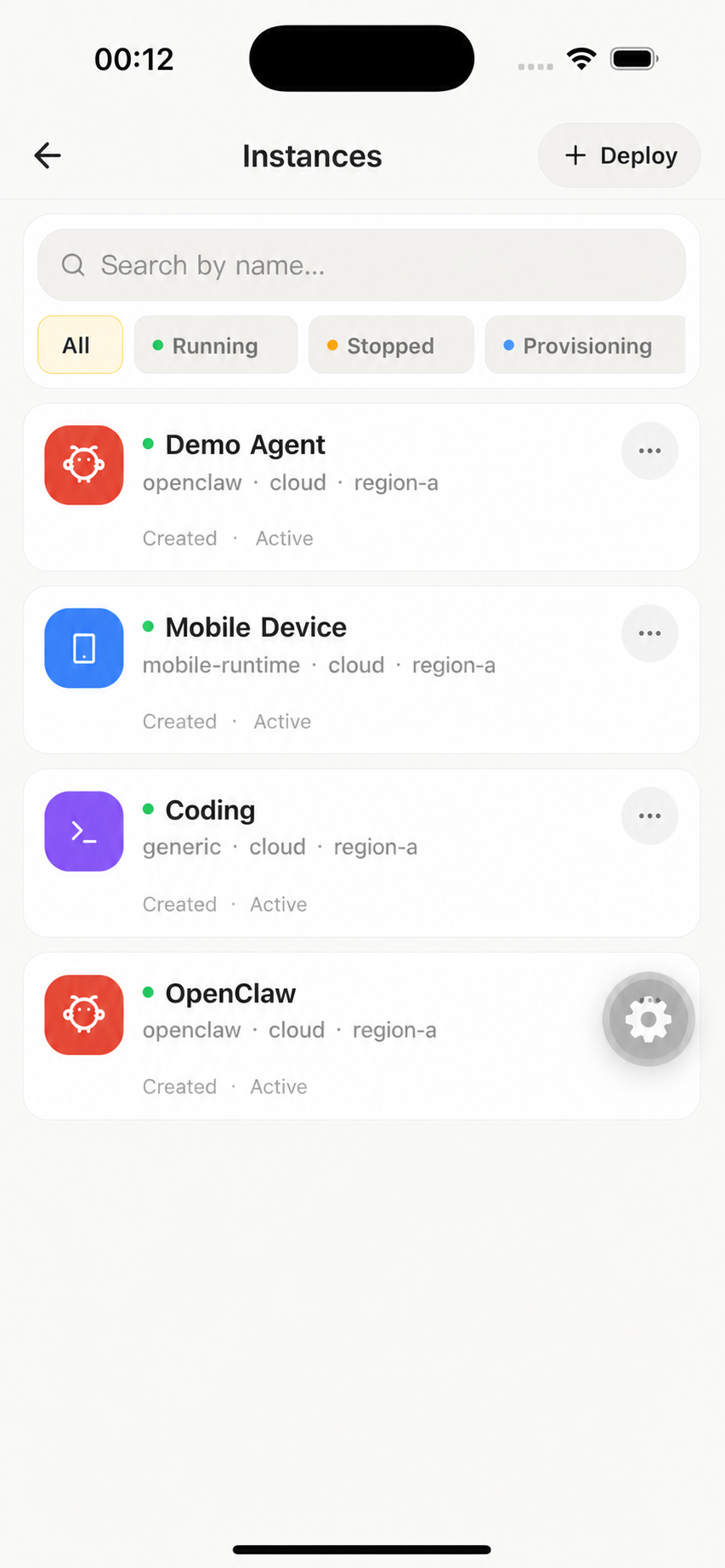
View all instances centrally
The list shows agent type, Hosting, Region, runtime state, creation, and recent activity. Users can distinguish Running, Stopped, and Provisioning instances at a glance.
Instance lifecycle
Manage the instance from creation and runtime through stopping or destruction from the same entry point.
Scheduled tasks
Use Once, Interval, and Cron for one-time or recurring work and review Run History.
Available nowState, logs, and events
See whether an instance is healthy, how far a task has progressed, and where an exception occurred.
Available nowLive screen and takeover
View a desktop or device and take control for sign-in, approval, page changes, or device exceptions.
Available nowSessions, files, and Shell
Manage Sessions, Files, Shell, Canvas, and remote execution environments in the Workspace.
Available nowKeep using existing enterprise systems, tools, and agents.
BeeOS supports multiple standard protocols and connectors, so enterprises can work with existing assets instead of rebuilding an integration stack.
OpenAPI / RESTBusiness systems call BeeOSCreate instances, submit tasks, query state, and read results.
MCPAgents use toolsConnect search, email, documents, code repositories, and business services.
A2AAgents collaborateDiscover agents, send tasks, synchronize state, and return results.
CLI / SDKEngineering and operations integrateBring deployment, instances, and task management into existing workflows.
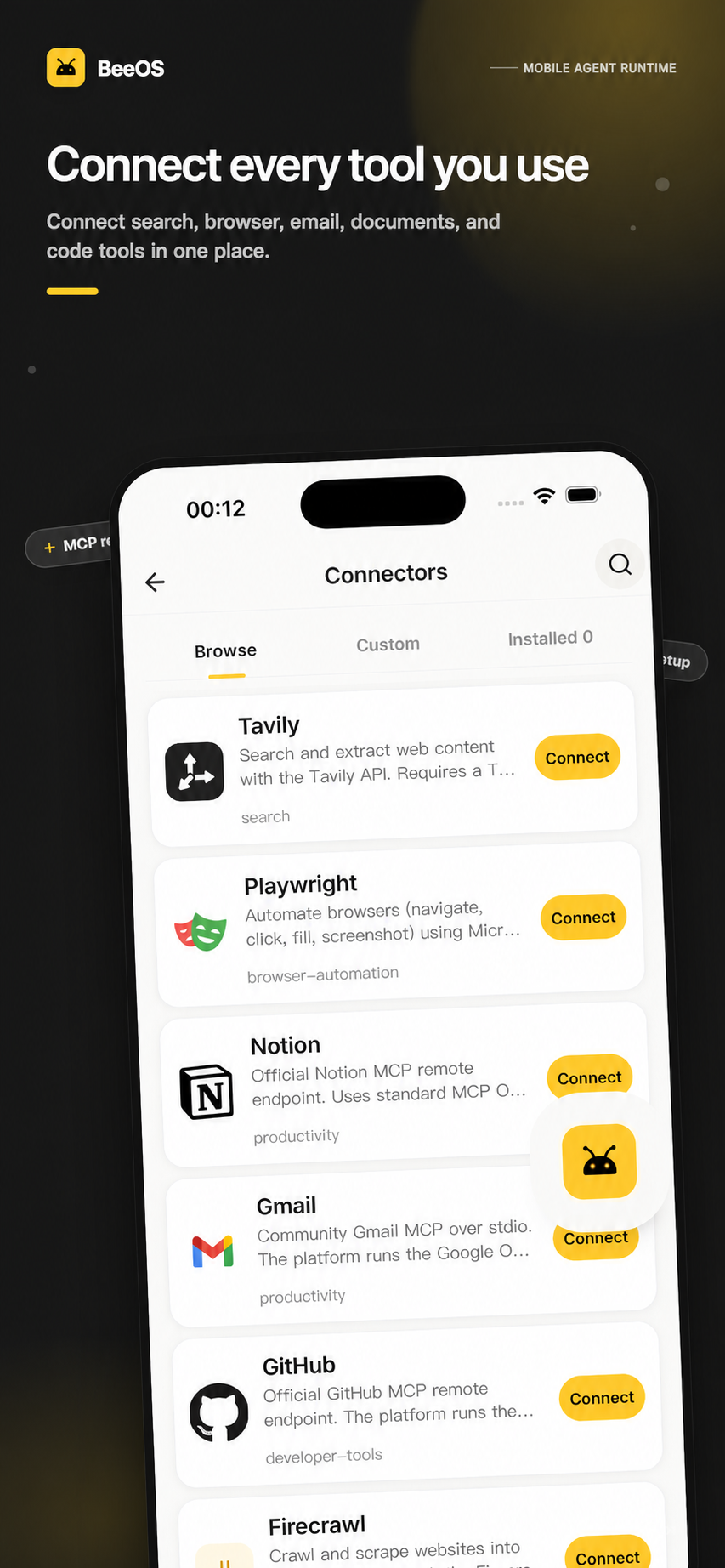
Connectors preserve tool and account connections
Browse, connect, and configure search, documents, email, GitHub, browser automation, and other tools.
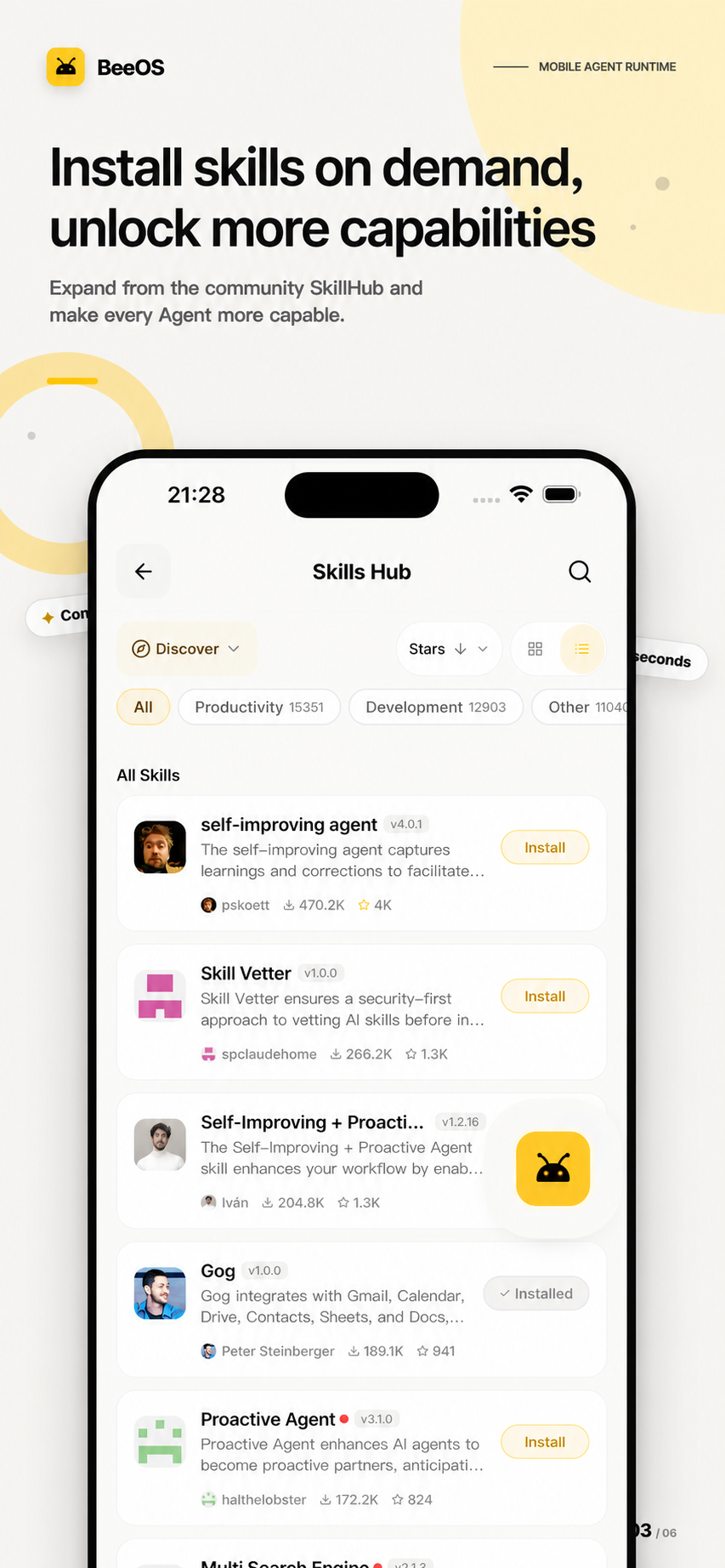
Skills preserve reusable capabilities
Save research, development, file, and device operating methods as Skills that different agents can install and configure.
View model, instance, and device usage centrally.
Understand where resources are consumed and set an acceptable usage range for teams and tasks.
Usage management
Review records and trends by model, instance, and device to understand consumption and set suitable operating ranges.
Available nowRead the task, inputs, and environment.
Explore APIs, web, desktop, or devices.
Create a reusable process.
Return changes to the agent.
Enterprise value
- Turn implementation experience into a process asset
- Reduce repeated configuration and manual work
- Reuse the same process across teams
- Connect APIs, web, desktop, and devices
Capability structure
- Save process inputs, actions, state, and outputs
- Manage process versions and repeated execution
- Record result checks and execution history
- Return exceptions to an agent or a human
Set task boundaries and let agents distribute work.
Wallet & Pay
For tasks that involve permissions, budgets, and approvals, connect the task boundary with runtime execution so critical actions follow explicit rules.
Define allowed systems, actions, and resources.
Apply enterprise rules to critical operations.
Keep authorization, operation, and result with the task.
Agent Network
Use A2A so agents can discover one another, delegate tasks, synchronize state, and return results or files.
Find an agent that can complete the task.
Send work and keep state synchronized.
Send results and files back to the requester.
Enterprises can control runtime location, data paths, and operating access.
Cloud, Local, and Self-hosted provide different infrastructure locations, data boundaries, and management responsibilities.
Agents can run on enterprise-controlled infrastructure.
Choose Cloud, Local, or Self-hosted according to data, network, and system connectivity requirements.
| Deployment | Agent and execution environment | Infrastructure management | Best fit |
|---|---|---|---|
| BeeOS Cloud | Runs on BeeOS-managed cloud resources | BeeOS | Fast creation and centralized management |
| Local | Runs on a local computer or server | User / enterprise | Local environments and files |
| Self-hosted | Execution nodes run on enterprise infrastructure | Enterprise manages infrastructure; BeeOS provides runtime management | Enterprise networks and business systems |
Enterprise-controlled
- Servers and network environment
- Agents, models, and business configuration
- Business systems, accounts, and data
- Task rules and use of results
BeeOS capabilities
- Runtime and instance management
- Devices, connections, and remote operation
- State, logs, and runtime history
- Usage records and open protocols
Enterprises can control what agents access and execute.
Agent access includes not only who can sign in, but also tools, data, actions, budgets, and confirmation rules.
Define who can create, use, and manage agents.
Separate access by instance, device, and workspace.
Control connectors, API keys, and external services.
Determine data paths through deployment and business-system boundaries.
Route critical operations into human confirmation and takeover.
Access boundary
Manage use of external systems and tools through account connections, Connector authorization, and API keys.
Runtime control
Use state, logs, device control, and human takeover to understand and handle critical steps.
Enterprise deployment
Choose Local or Self-hosted and define connectivity around enterprise network and data requirements.
Start with one agent and one real task.
Validate the task, runtime location, system connections, and human takeover before expanding to more agents, processes, and governance.
Pick frequent, clearly bounded work that a person can review.
Select Cloud, Local, or Self-hosted based on speed, data, and infrastructure.
Connect Browser, Desktop, Android, tools, or enterprise APIs.
Review state, logs, takeover, usage, and task results before expanding.
From pilot to scaled operation
Choose one agent and one real task, select Cloud, Local, or Self-hosted, and connect the first environment.
Add web, desktop, Android, tool connections, and schedules; preserve stable work as reusable processes.
Adapt permissions, budgets, records, and cross-agent collaboration to enterprise requirements.
Measure product value with operating outcomes
Time to create the first agent, add an environment, or connect another agent type.
Active instances, scheduled-task completion, exception diagnosis, and recovery time.
Takeover frequency, reasons for intervention, and return to operation.
Repeatable automations, reuse across teams, and process versions.
Model, instance, device, and tool usage within agreed operating ranges.
Coverage of connections, accounts, approvals, and traceable runtime records.